A Seven-Day Headless Replatform — An Engineering Story About Shipping With AI (Part 1)
- Rafal Koziarz
- Technology , E commerce
- April 21, 2026
Table of Contents
A slightly lengthier read about accelerated development using AI and lessons learnt migrating an ecommerce platform
A Seven-Day Headless Replatform — An Engineering Story About Shipping With AI (Part 1)

Table of Contents
- Why I Haven’t Written in a While (Again)
- The Problem with Templated Wix
- Why Not Just Go Shopify?
- The Stack
- The Build Process
- Catalog v1 vs v3 — The Surprise
- The Checkout and Auth Architecture (This Bit Was Hard)
- Payments: What Works, What’s Next
- Images: Why I Stayed on Wix CDN
- Content: Keeping the Client in Control
- Engineering Discipline With AI in the Loop
- What We Unlocked
- Beyond the Code
- What’s Coming in Parts 2 and 3
- Before You Go…
Why I Haven’t Written in a While (Again)
In my last post on context engineering I wrote about the shift from hobby coding to shipping production systems for clients at Cohort. What I didn’t say in that post is that in parallel I was also shipping another production system — a full headless replatform of a revenue-generating e-commerce store.
Seven days from first commit to live traffic. Running cost flat versus the old stack. UX transformed. And, as it turned out, a running education in how to work with AI coding tools on something that actually has to work. That last part is what I want to talk about more than anything else.
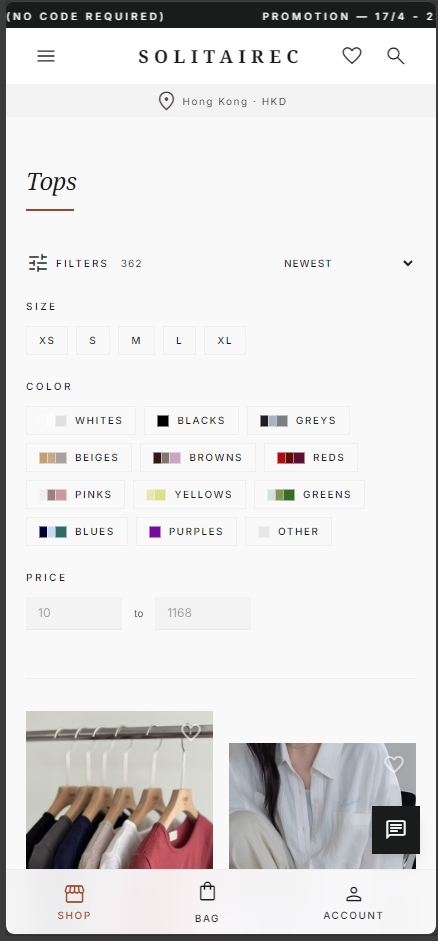
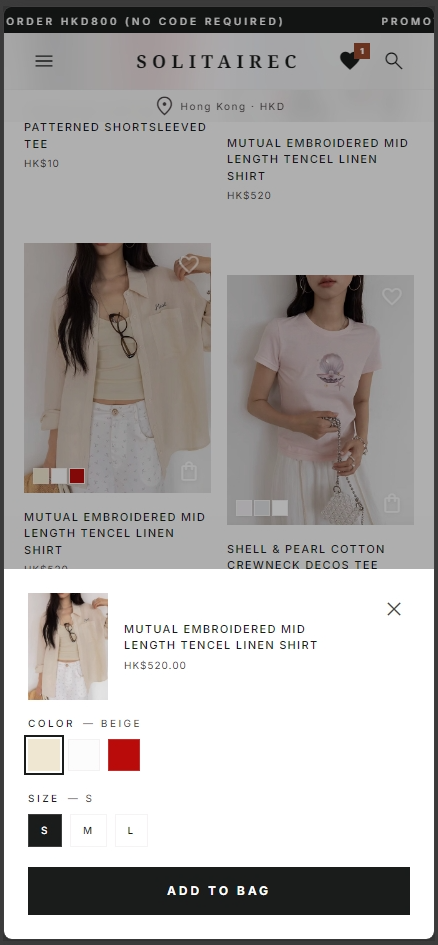
The client is SolitaireC, a luxury fashion brand importing from Korea and Japan, based in Hong Kong. Roughly HKD 4M in sales over four-to-five years, all on a templated Wix shop. The platform paid its bills. It was also, quietly, capping the business.
This is Part 1 of a three-part series.
- Part 1 (this post) — the engineering story. Headless Next.js on Vercel, Wix retained as the backend, and what working alongside Claude Code on a production codebase actually looked like.
- Part 2 — the distribution layer. Meta Pixel + CAPI with server-side deduplication, GA4, Microsoft Clarity, and the GEO / AEO / LLMO experiment I’m running on the live site.
- Part 3 — the GenAI layer. Building a look-designer on top of the catalogue so shoppers can turn a mood into a full outfit, flat-lay generated image included.
The Problem with Templated Wix
Wix’s pitch is WYSIWYG editing and a plugin for everything. That’s also the problem. A launched Wix store in DevTools is a study in noise — too many events firing, a flurry of XHR requests, console errors from slightly-stale plugins, a page carrying a lot of weight for what it’s doing. The customer can’t articulate it but absolutely feels it: clicks with no loading indicator, currency switchers that forget state, location detection that guesses wrong.
Editing is fragile. Mobile and desktop breakpoints drift apart subtly over four years of incremental design tweaks. Changing templates is a multi-week exercise. Premium plugin bills quietly stack up for features that feel like they should be built in — a search bar with product images, for example, is a paid plugin.
To be fair: the Wix backend is mostly solid. The CMS is fine, the CDN is genuinely good, Stripe integration is clean, and the client is deeply familiar with the admin. The front-end is just not where Wix shines, and the cruft that accumulates on a templated store over four years of campaigns eventually becomes load-bearing. That was the situation we needed to get out of without asking the client to relearn her business.
Why Not Just Go Shopify?
A fair question.
We had two reasonable paths. One was to rebuild everything on Shopify — a platform the client doesn’t use, with a new admin to learn, new processes, new third-party app ecosystem, and a migration of years of customer, order, and content data. The other was to keep the backend she already knows and rebuild only the front-end, using the Wix SDK as a headless CMS + commerce backend, with a new Next.js app consuming it.
Option two wins on almost every axis for a founder-operated business. The client doesn’t have to learn anything new. Orders, customers, promotions, inventory, CMS collections — all live where they already live. What changes is the part that was holding the business back: the customer-facing site. No migration. No retraining. Much better ceiling.
The Stack
| Layer | Choice | Note |
|---|---|---|
| Front-end framework | Next.js | App Router, ISR for product pages |
| Hosting | Vercel | Edge, logs, analytics, alerting in one place |
| Backend (commerce) | Wix via SDK | Catalog v1 (more on this below) |
| Backend (content) | Wix CMS collections | Banner copy, feature flags, ordering helpers |
| Payments | Stripe | Cards, Apple Pay, Google Pay, PayPal instant-buy |
| Local HK payments | PayMe (manual QR for now) | Airwallex on the roadmap |
| MarTech | Meta Pixel + CAPI, GA4, Microsoft Clarity | More in Part 2 |
| Source control & CI | GitHub + Vercel builds | Feature branches → PR → preview → prod |
| Project management | Linear | Shared with the client; kanban style |
| Design | Google Stitch (v2) | Mood-boarding + exportable prompt files |
| AI-assisted coding | Claude Code | Custom instructions for Wix SDK headless |
The Build Process
I set up a Linear board before writing any code. The client could see the kanban, add change requests, and log bugs in the same place I was tracking features. Fifteen minutes to walk her through kanban (I chose it over scrum — a one-developer team with one stakeholder doesn’t need sprints, it needs a flow of small cards) and she was contributing from day one.
My convention: every feature is a Linear ticket, every branch is feature/<ticket-slug>. Linear picks up the branch, picks up the PR, and auto-closes the ticket on merge. Small thing, but it means I never manually close a ticket and the client’s view of “what’s in” is always accurate without me curating it.
Design I did in Google Stitch v2. Stitch lets you describe a feel — in our case minimalistic luxury — and an LLM guides you through colour, typography, and layout choices with a live moodboard the client can poke at. It took about ten minutes to generate, and an hour of joint review with the client. What I love about Stitch is it exports clean Markdown prompt files with sample images, which I imported straight into the repo. Claude Code then reproduced the design as Next.js components. The design → code gap is thinner than it’s ever been.
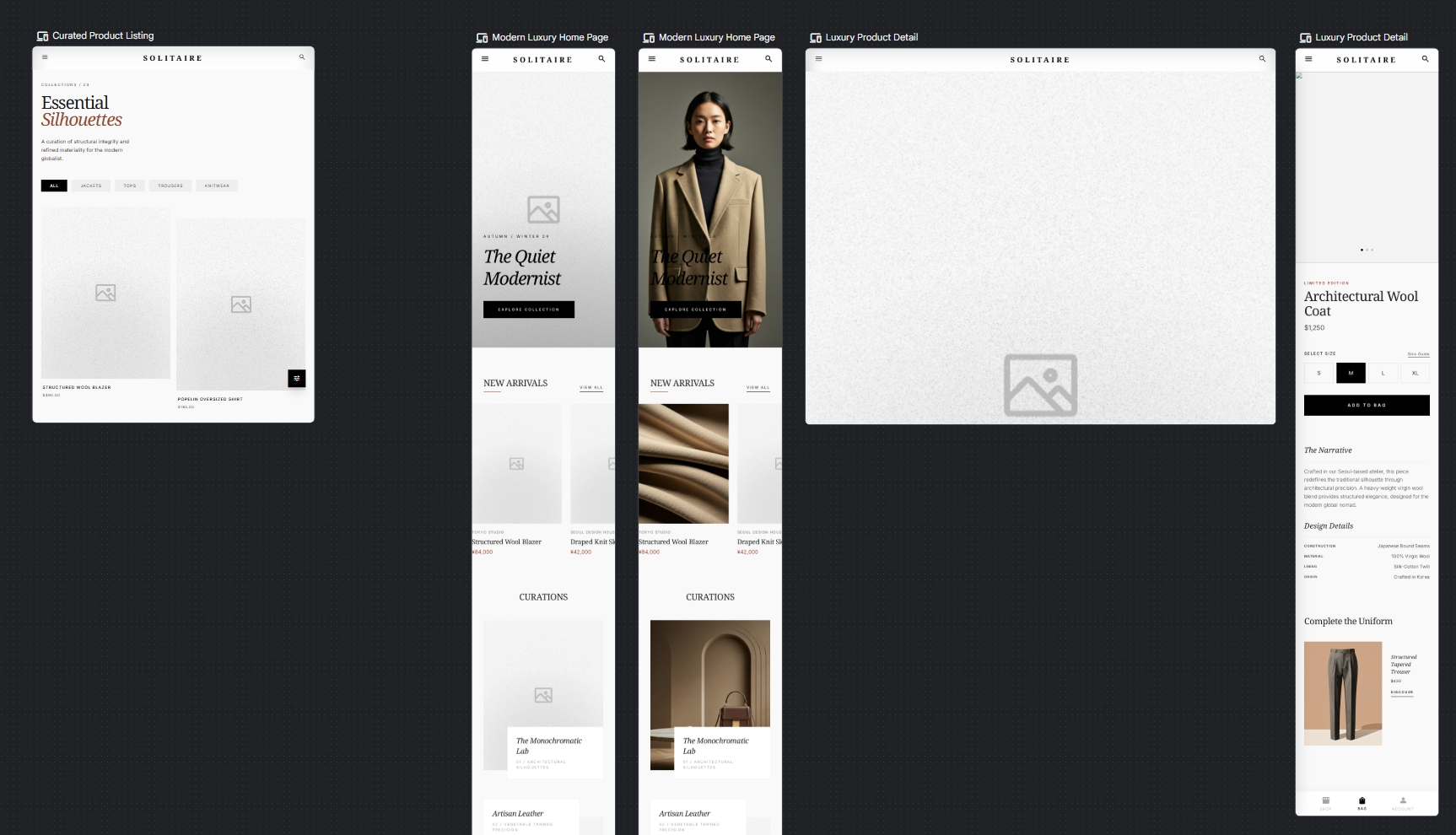
Development was Claude Code with custom project instructions (not sub-agents) tuned for Wix SDK headless app patterns. Every change shipped through a feature branch, PR, Vercel preview deploy, merge to main, automatic production deploy.
The whole thing went live in seven days. I should be precise here: that’s seven full days, not five working days — I was on this continuously. Design phase is included in that window; it was small. After launch, there was another week of iterations — edge cases, small UX improvements, MarTech polish — with the site live and taking orders.
One week is still fast, even with the caveats. The Wix backend being a mostly-solved problem helped enormously, but “mostly” is doing real work in that sentence, and the next few sections are the evidence.
Here’s the shape of the build pipeline:
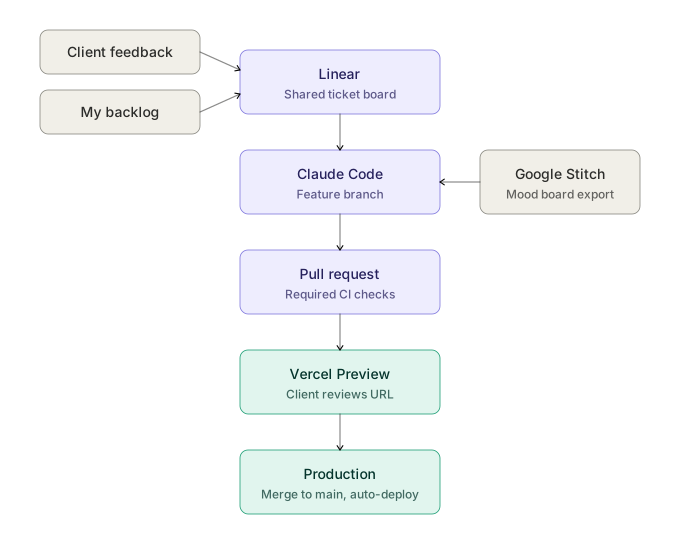
Client feedback and my own backlog feed into Linear. A ticket spawns a feature branch, which Claude Code implements — with Google Stitch design exports consumed directly as Markdown prompts rather than reinterpreted from screenshots. Every PR runs required CI checks and generates a Vercel preview URL that I paste back into the Linear ticket for client review. Merge to main auto-deploys to production.
Catalog v1 vs v3 — The Surprise
Wix Stores has two catalogue API versions. New accounts get v3. Older accounts stay on v1 and Wix will not auto-migrate you. You can apparently request migration through a support ticket, but the path isn’t documented, and I’ve seen nothing that tells me what would or wouldn’t break. For a live revenue-generating store, “we’ll see what happens” isn’t an acceptable answer.
I discovered this happily when I sat down to build a New Arrivals section. Cardinal ordering — letting a merchandiser say “this is rank 1, this is rank 2” — is a v3 thing. In v1 you get created-date, updated-date, price, and a few other sort keys. None of them map to “merchandiser’s intuition.”
Workaround: a Wix CMS collection that mirrors the ordering I need. I manage the rank in the collection, and the Next.js code reads from the collection rather than trying to sort products directly. It’s a layer I’d rather not have, but it’s a layer that the client can maintain in the admin she already uses, which is the best possible outcome.
Note: I’m sure New Arrivals isn’t the only v1 gap I’ll hit. If you’re on an older Wix account and considering headless, assume v1 and plan around it. The later “Gotchas” section has another example.
The Checkout and Auth Architecture (This Bit Was Hard)
Easily the hardest thing in the build.
The Wix SDK exposes a lot of what you’d expect — products, inventory, carts, members, CMS — but checkout and authentication are not SDK-accessible in the way the rest of it is. They’re tightly coupled to the Wix engine itself and only ship as part of a WYSIWYG-editor site, served as special /_checkout and /_auth routes. The documentation does not lead with this. You find it by trying to do the obvious thing and watching it fail.
Rebuilding them from scratch was on the table briefly. Two reasons we didn’t:
- The SDK exposes many of the building blocks — tax rules, shipping options, promotion definitions, inventory, product data — but not the checkout orchestration on top of them. Applying those rules to a cart, resolving a final total, running validation and fraud signals, the whole state machine from “cart” through “checkout” to “order” is not exposed. You’d have all the ingredients and be reimplementing the recipe.
- Auth is OAuth with a set of preconfigured social providers already set up in this account. Rebuilding means reconfiguring every provider from scratch, for zero UX gain.
The workable path: keep a minimal WYSIWYG Wix site alive on a subdomain, purely to serve the magic routes.
- Apex
solitairec.com→ Next.js headless app on Vercel. - Subdomain
shop.solitairec.com→ legacy Wix site, which exists only to serve/_checkoutand/_auth. - At checkout, we redirect from apex to subdomain with a return URL. Auth does the same.
- Wix’s allowed-redirect list has to be configured to whitelist apex URLs.
Getting the redirects and the session handling to cooperate across domains took real finessing. And it opens a small family of new problems I didn’t fully anticipate at first:
- Sitemap resubmission and reindexing. All my new routes are on apex. Old routes (the ones Wix used to generate) are effectively dead. Google takes weeks to reindex; during that window you watch impressions from the old routes slowly taper while the new ones climb.
- Meta product feed. Wix’s auto-generated XML product feed — the one you point Meta ads at — doesn’t know about my new routes, because it was built for the WYSIWYG site’s URL scheme. I had to build my own feed on the Next.js side, including the SEO-mandatory bits:
hreflangfor international targeting, schema for delivery and refund policy, structured product data, the whole compliance list Google Shopping and Meta Catalogs both want. - Cross-domain attribution. A purchase starts on apex, completes on subdomain. Stripe’s own attribution works on subdomain, but my pixels live on apex. To stitch the story together, I added a Wix Automation that fires on
purchase-createdand calls a webhook on the Next.js side. The webhook is what fires the server-side Meta CAPI event with the deduplicatedeventId, and what writes the final attribution back to the MarTech layer.
Is this elegant? No. Does it ship without rebuilding a payment system, and does it keep the client on an admin she already knows? Yes. Part of engineering is knowing when “fine” is the correct answer.
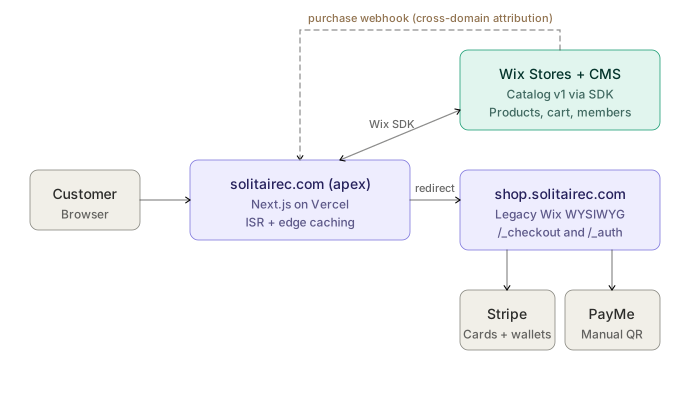
The apex runs Next.js and talks to the Wix backend over the SDK for products, inventory, carts, and members. Checkout and auth redirect to the legacy Wix site on the subdomain, which orchestrates Stripe (cards + wallets) and PayMe (manual QR for now). The dashed line is the purchase-created webhook that Wix Automation fires back to the apex app so the attribution story still stitches across the domain hop.
Info: This is also why I’m keen on moving checkout to Airwallex eventually. It would let us reclaim checkout on our own domain, kill the subdomain gymnastics, and add local HK payment methods that Stripe doesn’t offer. More on that next.
Payments: What Works, What’s Next
Today. Stripe handles the international rail: cards, Apple Pay, Google Pay, PayPal instant-buy. Everything most international traffic actually uses. Stripe does not offer AlipayHK (Stripe’s Alipay integration is mainland-only), FPS, or PayMe. PayMe in particular is currently a manual QR scan on a confirmation page, which is a real pain point for HK buyers who expect a one-tap flow.
Next. Airwallex. They support AlipayHK, FPS, and PayMe as proper programmatic payment methods, which means dynamic method selection based on buyer location and device — the right rail shown to the right buyer without them having to choose.
This is a Part 2 topic more than a Part 1 one, but it’s worth flagging here because it’s the single biggest UX improvement still on the roadmap.
Images: Why I Stayed on Wix CDN
I started the project reaching for next/image, because that’s what you do on Next.js, but I stopped pretty quickly. Wix’s CDN already does the image transformation work that next/image would give me — multiple sizes, WebP conversion, responsive serving — and it’s included in the subscription the client is already paying for. Moving the assets to a third-party CDN or to Vercel’s image layer would cost more for no benefit the customer can actually see.
Not every headless decision is about maximising control. Some of them are about not breaking something that already works.
Content: Keeping the Client in Control
The single most common way headless replatforms fail is “engineer ships something only engineers can operate.” The founder can’t update the banner. The seasonal promo requires a deploy. Content becomes an engineering ticket. The site slowly stops being hers.
This was the failure mode I was most paranoid about on this project, because the feedback loop with the client is extremely fast and any operational regression would show up within hours.
The answer: Wix CMS collections are the source of truth for editable content. Not just the product catalogue, but also banner visibility, banner text, collection metadata, promotional copy, and small feature flags for seasonal UI variants. The Next.js app reads from the collections and renders. The client edits collections in the Wix dashboard — the exact same admin she’s been using for four years — and the front-end updates on the next ISR revalidation.
She didn’t have to learn a new CMS. I didn’t have to build one. Win.
Engineering Discipline With AI in the Loop
This is the section the rest of this post builds towards. Most of what follows applies to any AI-assisted engineering project; the MarTech work on SolitaireC just happens to be where it showed up most clearly.
The headline: AI-assisted development doesn’t remove the need for engineering discipline — it changes where the discipline has to live.
The Silent Slide Into Copy-Paste
Early in the build, when the repo was small, the code Claude Code produced was genuinely clean. Sensible abstractions, tidy components, things in the right place. Somewhere in the middle — around the point where I was head-down on a feature and just prompting “add purchase tracking to this page” — it stopped refactoring and started copy-pasting.
By the time I had Meta Pixel + CAPI, GA4, Clarity, and Vercel analytics wired up, every tracked event on the site had N separate SDK calls inline, each manually constructing its own payload, with inconsistent field names across calls and at least one subtly wrong event name I only caught later. The purchase confirmation page was the worst of it — around sixty lines of idempotency handling, deterministic eventId hashing for Meta dedup, _fbc/_fbp cookie recovery across the Wix redirect, and four separate SDK calls living side by side.
I forced a refactor pass.
Before (purchase page, trimmed for readability):
Show the before code (~60 lines)
// Track Purchase for cart checkout (Wix redirect flow)
const foundOrderId = found._id ?? orderId;
const dedupKey = `tracked_purchase_${foundOrderId}`;

// Idempotency: skip if already tracked (e.g. page refresh)
if (sessionStorage.getItem(dedupKey)) return;

const totalAmount = parseFloat(
  (found.priceSummary?.total?.amount ?? "0").replace(/[^0-9.]/g, ""),
);
if (totalAmount <= 0) return;

const contentIds = (found.lineItems ?? [])
  .map((li) => li.catalogReference?.catalogItemId)
  .filter(Boolean);

// Deterministic eventId matching the webhook's hash for Meta dedup
const eventId = await purchaseEventId(foundOrderId);

// Recover _fbc/_fbp saved before the Wix redirect
const metaCookies = readMetaCookies();

trackMetaEvent(
  "Purchase",
  {
    value: totalAmount,
    currency: "HKD",
    content_ids: contentIds,
    content_type: "product",
    order_id: found.number?.toString(),
    num_items: found.lineItems?.length ?? 0,
  },
  found.buyerInfo?.email,
  found.buyerInfo?.memberId ?? found.buyerInfo?.visitorId,
  { eventId, fbc: metaCookies?.fbc, fbp: metaCookies?.fbp },
);
trackAnalytics("purchase", {
  order_number: found.number?.toString(),
  total: totalAmount,
  currency: "HKD",
});
clarityEvent("purchase");
clarityUpgrade("purchase");
clarityTag("purchased", true);
clarityTag("order_value", totalAmount);

sessionStorage.setItem(dedupKey, "1");
After:
Show the after code (~8 lines)
// Track Purchase — dedup, Meta eventId hash, fbc/fbp recovery, SDK fan-out all internal
await trackPurchase({
  orderId: found._id ?? orderId,
  orderNumber: found.number?.toString(),
  items: (found.lineItems ?? []).map((li) => ({
    productId: li.catalogReference?.catalogItemId,
    productName: li.productName?.original,
  })),
  value: parseFloat(
    (found.priceSummary?.total?.amount ?? "0").replace(/[^0-9.]/g, ""),
  ),
  email: found.buyerInfo?.email,
  buyerId: found.buyerInfo?.memberId ?? found.buyerInfo?.visitorId,
});
Roughly sixty lines to eight. Dedup, the deterministic event hash for Meta CAPI server-side deduplication, the _fbc/_fbp cookie recovery across the Wix redirect, and the four SDK fan-outs all now live behind a single trackPurchase() call. Adding a new MarTech destination is a one-place change. Renaming an event happens once. Payload normalisation happens once.
In parallel, I ran an audit prompt — “here’s what I’m capturing; here are the Meta CAPI / GA4 / Clarity / Vercel Analytics best-practice coverage lists; where are my gaps?” — and Claude produced a coverage matrix. It caught a handful of events copy-paste had quietly dropped.
Where Claude Code Genuinely Excelled: Tests
The counterweight to the refactor story is this one, and it’s the part of working with Claude Code that surprised me most on this build.
Early in the MarTech work, I noticed something off in the Network tab: some tracked events were firing before the analytics SDKs had finished loading. In production, that silently means lost attribution. Harmless-looking timing issues like this are exactly the kind of thing that never gets caught in manual QA — you’d need the right race condition, on the right network speed, at the right user interaction — and that quietly degrade campaign quality for months before anyone notices.
I asked Claude Code to write tests for it. What I got back was genuinely impressive: a test suite that mocked slow SDK loading, simulated rapid user navigation between pages, fired events before loaders resolved, and asserted that every event either arrived at every destination or was queued and flushed once loaders were ready. Tests for the Meta eventId dedup hash being deterministic across the client-side Pixel fire and the server-side CAPI fire. Tests for the _fbc / _fbp cookie recovery surviving the cross-domain Wix redirect. Tests for event ordering — that an add_to_cart from a rapid double-click doesn’t produce two events with the same timestamp that Meta will reject as duplicates.
Info: The lesson is not “Claude Code writes great tests.” The lesson is Claude Code writes great tests when asked, on specific hypotheses. I had to point it at the exact race conditions and dedup behaviours I was worried about. It will not, unprompted, propose a comprehensive test strategy. But when you hand it a specific failure mode, it produces rigorous, focused test code quickly — often with better edge-case coverage than I would have written by hand under time pressure.
Those tests now run on every PR and have caught at least two regressions before they hit production. For a solo-developer project, that’s outsized value.
Vercel as the Safety Net
Running as a one-developer team at this pace is only sustainable because the platform does real work.
Every PR opens a Vercel preview deploy on a unique URL. I send that URL to the client in the Linear ticket, she clicks around, leaves comments, and we iterate before anything touches production. Design-level feedback moves at the speed of DM, not email threads. Every merge to main runs the test suite as a required check — if the SDK loader tests go red, the merge is blocked. Production deploys are automatic on green. Rollback, if it’s ever needed, is one click.
For a solo engineer on a live revenue-generating site, that combination — preview URL per PR, required checks before merge, automatic promotion, one-click rollback — is what makes shipping seven days of work into a customer-facing store feel safe rather than reckless. The platform isn’t doing anything exotic; it’s doing the unglamorous CI/CD plumbing reliably, and that’s what matters.
The Broader Lesson
The three stories above — the refactor, the tests, the safety net — tell one story if you zoom out: AI coding tools are extraordinary on tight, well-specified tasks, and drift when you stop specifying tightly. They take the path of least resistance when you do.
That drift shows up in predictable places:
- Not reading current documentation. I use Context7 (which I wrote about previously) to keep the LLM aware of up-to-date docs. On this project, for stretches, it just didn’t consult them. The Wix SDK v1 has real documentation gaps — one concrete example: sorting by
updatedDateis supported by the Wix GraphQL API and by Wix’s own rendered sites, but the SDK types don’t expose it. I had toas any-cast my way through. Shipped, not proud. - Not recognising repetition it already created. The MarTech sprawl above didn’t happen in one bad session. It happened incrementally, each “add tracking to this page” prompt copy-pasting from the previous one, because that was the fastest next step. The fix isn’t a better prompt; it’s a periodic forced audit and refactor pass.
- Not proposing tests. Claude Code will happily ship code without tests unless tests are part of what you ask for. Writing the tests after the fact, specifically targeted at failure modes you’ve observed, turns out to be the right rhythm for this kind of work.
My rough mental model: LLM training data is funnelled toward the most common stacks. If you’re on React + Next.js + Vercel, you’re near the bright centre of the funnel and things largely work. Step slightly outside — older SDK versions, less common platforms, edge cases that the top ten Stack Overflow answers don’t cover — and you start seeing paste-and-pray behaviour. This is probably also why Lovable and similar products can ship so fast: a deliberately narrow stack means a narrow set of failure modes. That’s smart business, not a criticism.
We’re nowhere near autonomous senior-level engineering. A senior engineer is, among other things, someone who keeps refactoring while everyone else is running a feature out the door, and who thinks in failure modes before anyone asks for tests. Those are the things the tools don’t yet do on their own. They will do them brilliantly when you ask. The discipline is knowing when to ask.
What We Unlocked
- Lighthouse 80–100 across the board, mobile and desktop, across performance, accessibility, best practices, and SEO. I also re-tested against Google Search Console to make sure the SEO side is actually landing and not just scoring well in isolation.
- Running cost ~USD 50/month, all-in. Vercel hosting, logging, analytics, bandwidth. We dropped roughly the same amount in Wix plugin subscriptions that we no longer need, so the net running cost is about flat — but the capability ceiling is vastly higher. “Flat cost, much better platform” is a better sell to a founder than “cheaper but you have to retrain everyone.”
- International organic traction. In the first live weeks we’ve taken organic orders from Canada, Saudi Arabia, and a handful of Asian countries outside Hong Kong, with zero paid spend in those markets. Hong Kong is a saturated market for boutique fashion; going semi-global is the obvious next move, and the new infrastructure is what makes it economically sensible to pursue.
- UX that feels different. Quick add-to-cart, browsing history, a simplified wishlist, near-zero “dead clicks” in Clarity’s session replays. Both the client’s gut impression and the behaviour data say it.
- Sales up ~30% on the rolling 30-day window vs the prior 30 days.
On that last number, I want to be honest. At time of writing the site has been live for roughly two weeks of the thirty-day comparison window, and the MarTech rebuild shipped at the same time as the platform. I can’t cleanly attribute 30% to the platform alone — and I wouldn’t ask you to believe me if I did. What I’d say is: the platform is what made the MarTech rebuild possible, and the rebuild is what’s unlocking the campaign quality. By the time the first full 30-day cycle on the new site closes, I’d expect the number to be stronger. I’ll revisit it in Part 2 with more data.
Beyond the Code
A side-effect of working this closely with the client is that the consulting extended past the platform. SolitaireC imports from small Korean and Japanese vendors, many of whom send product data as JPGs with sizing text burned into the image and copy in mixed languages. Not exactly structured.
I introduced the client to Gemini Gems — custom pre-prompted agents — as a way to structure vendor intake. Translate, normalise, extract sizing, generate a first-pass product description. What was a slow manual process is now a fast semi-automated one, and we’re scoping a more complete automation (vendor data → structured catalogue → draft ad campaigns) which is Part 3 territory.
The point being: once you own the front-end and the catalogue shape, the tools you can build on top of the business multiply quickly. Part 3 is entirely about that.
What’s Coming in Parts 2 and 3
Part 2 — Distribution. The full MarTech rebuild: why Meta’s default Wix pixel implementation underperforms, how two-source server-side deduplication gets us to 100% event match quality on most days, what Microsoft Clarity’s near-realtime session replay does for UX decisions (it’s remarkable that this is free), and how GA4 closes the attribution loop. Then the bigger topic: GEO / AEO / LLMO — optimising a site for visibility inside commercial LLMs like ChatGPT, Claude, and Gemini. I’m running SolitaireC as a live case study for this, and it’s also something I’m productising for regulated FS clients.
Part 3 — The GenAI Layer. A look-designer on top of the catalogue. A shopper describes a mood, a vibe, a situation — the system assembles a complete wardrobe from in-stock SolitaireC products and generates a flat-lay image of the outfit. (Flat-lay rather than on-model for unit economics — LLM image generation is still expensive enough that “on a model” per look isn’t practical yet. But flat-lay is plenty to inspire.) The structured catalogue we built in Part 1 and the attribution layer we’ll finish in Part 2 are the reason any of this is possible.
Before You Go…
TLDR. Templated Wix → headless Next.js on Vercel, with Wix kept as the commerce and content backend. Seven full days to build, plus a week of polish. Biggest engineering lesson: AI coding tools are extraordinary on tight, well-specified tasks and drift when you stop specifying tightly — forced refactor passes, tests written against specific failure hypotheses, and Vercel’s quality gateways are what made this safe to ship solo. Lighthouse 80–100 across the board, running cost flat versus the old stack, sales up ~30% in the first two weeks live (caveats acknowledged). Parts 2 and 3 coming — the MarTech and GEO story, then a GenAI look-designer on the catalogue.
If you’re replatforming a shop like this and want to know what you’re walking into before you commit, find me on LinkedIn. If you’re here for the AI coding war stories, Parts 2 and 3 will have more of those.
And yes, Home Lab Part 2 is still owed. Between the new Gemma model, TurboQuant, OpenClaw and the explosion of open-source agent harnesses, the local-AI story has moved on enough that when I finally write it, it will be a different post to the one I would have written last summer. I consider this a feature.